# Introduction
👋
"Welcome to Clarity – Your Gateway to Decentralized Innovation!
At Clarity, we're not just simplifying governance for Web3 Organizations and Decentralized Autonomous Organizations (DAOs); we're revolutionizing how the world connects and collaborates. Our roots in blockchain technology have nurtured innovative ways to organize and govern, firmly planting us at the forefront of this transformative era.
DAOs represent more than just technology; they are a movement towards decentralization, autonomy, and collective power. Through the use of smart contracts and distributed ledger technology (blockchains), Clarity brings transparency and trust to the forefront of running an organization. We empower individuals worldwide to unite, coordinate, and self-govern in a manner that's as transparent as it is revolutionary.
Our comprehensive documentation is your guide to mastering DAOs. Whether you're creating, managing, or participating, we're here to illuminate your path. With Clarity, you'll learn first-hand how decentralized governance can help you reach your organization's goals and mission. Your journey with us is more than an education – it's an empowerment to reshape traditional organizational structures to work for everyone.
When you're done reading, join us on the Clarity platform, where every transaction is a step towards transparency and every voice is empowered. We're innovating for tomorrow’s DAOs, making organization simpler, and bringing decentralized communities together.
# Decentralized Autonomous Organizations
What is a DAO?
A Decentralized Autonomous Organization (DAO) is a groundbreaking concept that harnesses the potential of blockchain technology to enable decentralized decision-making and self-governance. Unlike traditional organizations that rely on hierarchical structures and centralized authorities, DAOs operate through smart contracts, which are self-executing agreements coded on a blockchain. These smart contracts enforce the rules and protocols governing the organization, facilitating transparent and autonomous operations. DAOs empower participants by giving them a direct say in the decision-making processes, allowing them to collectively shape the direction and actions of the organization. By eliminating intermediaries and promoting trustless interactions, DAOs foster an inclusive and borderless ecosystem that fosters collaboration, innovation, and the pursuit of shared goals. This page will explore the fundamental characteristics and benefits of DAOs.
Key Characteristics of DAOs:
1. Decentralization: DAOs give no special privileges to any of the members. The only way to make changes in a DAO is to conduct a community-wide vote that passes pre-defined winning criteria. No individual or small group has the ability to take funds out of a DAO without passing such a vote
2. Autonomy: DAOs operate based on predefined smart contracts, which enable them to execute community decisions automatically. This autonomy eliminates the need for intermediaries and ensures that the organization functions at the will of the collective.
3. Participation: DAOs allow anyone with an internet connection to participate and contribute to the decision-making processes. Participants can join DAOs, propose and vote on proposals, and contribute their skills and resources, fostering a truly inclusive and global community.
Benefits of DAOs:
1. Transparency: DAOs provide full transparency, as all transactions, proposals, and votes are recorded on the blockchain and can be accessed by anyone. This provides a permanent, auditable trail of all decisions a DAO makes.
2. Security: DAO treasuries are guarded by audited smart contracts, with no special privileges granted to anyone to withdraw from this treasury. This helps prevent malicious actors from rug-pulling a community treasury that is not guarded by proper community governance.
In conclusion, DAOs represent a transformative approach to organizing and governing communities. By leveraging blockchain technology, DAOs empower participants with transparency, autonomy, and inclusivity, reimagining traditional organizational structures. Through this documentation, you will gain the knowledge and tools to create, manage, and participate in DAOs, enabling you to contribute to the exciting world of decentralized governance and shape the future of organizations.
# Decentralized Organizations
What is a DO?
A Decentralized Organization (DO) is an organization that takes the community governance principles of a DAO, but does not enforce decisions automatically via a blockchain. There are lots of examples of DOs that exist in the real world already, like co-ops.
The key characteristics that DAOs and DOs share are:
1. Decentralization: Both DAOs and DOs make decisions with the consent of the governed, and follow through on the decisions made by the collective. It is important for these organizations to always act in this way, not only when it benefits a small group.
2. Transparency: Even if a Decentralized Organization is not recording its decision-making on a blockchain, it is transparent in publishing the results of votes and sticking to a defined decision-making process that is collectively agreed upon.
# Agora Overview
What is Agora, and how does it work?
As mentioned on the [Decentralized Autonomous Organizations](/dao-fundamentals/decentralized-autonomous-organizations) page, DAOs transfer the trust from an individual or group to an audited smart contract when it comes to executing and enforcing collective decisions.
[Agora](https://github.com/Liqwid-Labs/agora) is the audited library of open-source governance scripts that allow for DAO creation and management, built specifically for Cardano. The protocol allows DAOs to operate completely on-chain, from spinning up to collectively managing funds and voting on proposals.
## Agora Summary
Users deposit governance tokens into stakes, which allows them to create and vote on proposals. Voting weight is equal to the staked amount. Proposals specify smart contract effects on-chain that are executed if and only if the community-wide vote passes.
**Examples of proposal smart contract effects include:**
1. Management of a treasury containing ADA and/or other assets.
2. Changing on-chain parameters that are meaningful to the DAO. For example, changing the amount of GT required vote in favor of a proposal for it to execute.
3. Swapping treasury assets.
4. Staking DAO treasury assets.
In Agora, these effects are expressive and can be added to the system at any point. This is useful because it means proposals can adapt to changing needs and developments in the Cardano ecosystem.
## Agora Concepts
This section gives a very high level overview of the parts of Agora that are most relevant to your experience using Clarity. For a more detailed overview of the inner-workings of Agora, see the [Agora Specs](https://liqwid.notion.site/e85c09d2c9a542b19aac8dd3d6caa98b?v=b6442faef00849fa8e92bc3771a22630).
### Governance Token
The token that enables individuals to take governance actions in an Agora DAO. Each DAO designates its Governance Token when created, which can be any Cardano Native Asset. This asset is identified by the token's unique Policy ID and hex-encoded name. This means NFT collections don't work well as Governance Tokens, because the hex-encoded asset name of a collection will differ from token to token.
### Governor Contract
This is the smart contract that enforces the governance rules of a DAO on-chain. This contract can be customized to fit an individual organization's needs. The following parameters are configurable and controlled by the governor contract:
* Governance Token
* The token used to grant governance power to DAO participants
* Proposal Timing
* The cadence at which all proposals will move through their [stages](/clarity-v1/key-distinctions/polls-vs-proposals#proposal-timing-configuration)
* Proposal Approval Threshold
* The number of tokens that must be staked behind votes for a proposal for it to pass
* User Participation Thresholds
* The minimum amount of Governance Tokens a stake must hold to be used to either create or vote on a proposal.
* Maximum Proposals per Stake
* The maximum number of proposals one stake can be used to create.
* Vote Cool Down Period
* The amount of time that must pass after a DAO member submits a vote before they can retract it.
### Stakes
Stakes are how voting power is calculated in Agora. Stakes lock a DAO member's Governance tokens in a smart contract to prevent double-counting votes.
An Agora DAO member's governance power in on-chain actions is equal to the number of governance tokens they have locked in their stake(s). This power will be used to ensure the user meets the User Participation Thresholds set by the governor contract and is used to weigh votes submitted using the stake.
#### Stake States
Stakes can be in several states which determine what can be done with them.
* **Locked:** Proposals are Locked when they are being used in a vote. The stake can still be used to create and vote on other Proposals, but the Stake cannot be edited or deleted. To edit or delete stakes, all votes using that stake must be retracted.
* **Free:** The stake can be used to create and vote on proposals. Governance Tokens behind the stake can be added or removed.
### Proposals
DAO members create Proposals for the DAO using Stakes.
Proposals allow DAO participants to hold community-wide votes on-chain. When a proposal is created, it must explicitly define what its effects will be if the proposal is passed.
Agora allows for any combination of smart contracts to be effects of a proposal. A Proposal defines which effect(s) will run, and with what arguments. For example, a proposal could be created using the 'Treasury Spend' effect, with arguments that define which assets to send, how much, and to which addresses.
These effect smart contracts will execute as proposed if and only if the Proposal is passed by a community-wide vote.
### Votes
DAO members cast Votes on Proposals using Stakes.
Votes are transactions that add a members's contribution to the Vote Tally and lock the Stake that was used to prevent double-voting.
Voting on multiple proposals is also made possible, since the only thing that is prevented when a lock is placed is withdrawing and depositing governance tokens.
#### Vote States
Votes can be in several states which determine what can be done with them and the Stakes they use.
* **Cooling Down:** The vote is not able to be retracted until the Vote Cool Down Period, as defined in the DAO's [Governor Contract](/dao-fundamentals/agora-overview#governor-contract), has elapsed. The Stake being used for this vote is [Locked](#stake-states).
* **Submitted:** The vote is recorded and the Vote Cool Down Period has passed. The vote can be retracted if the owner desires. The Stake being used for this vote is [Locked](#stake-states).
* **Retracted:** The vote is removed and no longer counts towards the Vote Tally. The Stake that was used used for this vote is [Available](#stake-states) (assuming it is not Locked by any votes on other Proposals).
# Connecting Your Wallet
Before interacting with the Clarity Platform follow these instructions to connect your wallet.
**Step 0: Have a Cardano wallet from the list below installed, on the proper network, with collateral set.**
The following wallets are supported by Clarity
* Eternl
* Flint
* Gero
* Lode
* Lace
* Nami
* Nufi
* Yoroi
* Vespr
Make sure your wallet is on the right network. Need help? See: [Switching Networks](/getting-started/connecting-your-wallet/switching-networks)
Make sure your collateral is set. Need help? See: [Setting Collateral](/getting-started/connecting-your-wallet/setting-collateral)
Eternl users should [connect to Clarity using the Eternl DApp Browser](/getting-started/connecting-your-wallet/eternl-dapp-browser)
**Step 1: click "Connect Wallet"**
**Step 2: select the wallet option you would like to use.**
Your first time connecting to Clarity with a wallet, you'll need to [Register for Clarity](/getting-started/connecting-your-wallet/register-for-clarity).
That's it! You are all set to start interacting with the Clarity Platform.
# Setting Collateral
Within the Cardano blockchain, collateral serves as a mechanism to ensure the successful execution of smart contracts. Its purpose is to provide a guarantee that nodes involved in the process receive fair compensation for their efforts. As long as the collateral remains intact (which is a highly unlikely scenario), you retain the ability to withdraw it whenever desired, allowing for flexibility and control over your assets.
This page shows how its possible to set collateral for each of the wallet types supported on Clarity
* [Nami](#nami)
* [Eternl](#eternl)
For mainnet, you'll need a bit over 5 ADA to set collateral. For testnet, you'll need tADA, which you can get from the [Cardano Testnet Faucet](https://docs.cardano.org/cardano-testnet/tools/faucet/).
## Nami
**Step 1: Click your profile in the top right**
**Step 2: Click 'Collateral'**
**Step 3: Enter your password to set collateral.**
## Eternl
**Step 1: Click 'Settings'**
**Step 2: Enable the collateral toggle.**
**Step 3: In the expanded Collateral section, click 'Set Collateral'**
# Switching Networks
This page shows how its possible to switch Cardano networks for each of the wallet types supported on Clarity
* [Nami](#nami)
* [Eternl](#eternl)
## Nami
**Step 1: Click your profile in the top right**
**Step 2: Click 'Settings'**
**Step 3: Click 'Network'**
**Step 4: Choose network.**
Use 'Preview' for testnet, and 'Mainnet' for mainnet.
## Eternl
**Step 1: Open Eternl and click the network in the bottom right.**
**Step 2: Choose network**
Use 'Preview Testnet' for testnet, and 'Cardano Mainnet' for mainnet.
# Eternl DApp Browser
Make sure your DApp Browser is enabled to allow your Eternl wallet to connect to Clarity. The connection icon should be **green** as pictured below. If the connection icon is not green, simply click it to enable connections.
# Register for Clarity
Registering for Clarity allows you to use all of the governance features the platform enables.
Your profile name and image are optional. These can be used to make it easy for others in your DAO communities to identify you if you desire.
Users must agree to Clarity's [Terms of Service](https://clarity.community/terms) and [Privacy Policy](https://clarity.community/privacy).
# Brave Browser Connection Error
Certain privacy settings in the Brave browser have been reported to cause errors when connecting to Eternl wallets.
If this is the case, try disabling the 'Brave Shield'.
If the problem persists, try using Google Chrome or an alternative browser while we work to resolve this incompatibility. If your problems persist, please reach out to us at .
# Using Clarity on Testnet
Clarity provides a Testnet deployment to provide an environment to take governance actions without paying real transaction fees.
Some features of Clarity are limited to the Testnet version.
# Minting Governance Tokens
A step by step guide to show you how to mint governance tokens for a DAO.
Minting Governance Tokens is limited to the [Testnet](/getting-started/using-clarity-on-testnet) version of Clarity.
Since participating in DAOs requires users to create Stakes using Governance Tokens they hold, DAOs need an easy way to distribute Testnet tokens to test users.
The asset that is minted by this function has the following metadata:
> **Policy ID:** 919d4c2c9455016289341b1a14dedf697687af31751170d56a31466e
>
> **Asset Name Hex:** 74434c4152495459
**Step 1: On the DAO's Dashboard page, click 'Mint Tokens'**
**Step 2: Choose how many tokens to receive.**
**Step 3: Confirm minting**
**Step 4: Sign the transaction**
Once the transaction has been accepted on-chain, the Governance Token will appear in your wallet. This may take several minutes.
# Navigating Clarity
## Explore DAOs
Find DAOs for communities you are a part of or want to join. Click the Explore DAOs page and browse the Existing DAOs using Clarity.
## Visiting
To visit a DAO, click it on the Explore DAOs page. You'll see more pages for this Organization appear in your sidebar.
You'll notice since you are not a member of this DAO, the navigation appears under the 'Explore' section still. As a visitor, you will be able to view different parts of an organization depending on the privacy settings of that DAO. To view all pages, visit the Membership page and join the DAO you're interested in!
## Viewing a DAO you are a Member of
When viewing a DAO you are a member of, it will show up in the top of your sidebar. To quickly jump between your DAOs, select them from this drop-down box.
# Key Distinctions
Clarity makes several key distinctions that are important to understand.
The first distinction is between **Organizations** and **Agora DAOs**. Read below for an explanation of the differences in these organizational structures.
[Organizations vs Agora DAOs](/clarity-v1/key-distinctions/organizations-vs-agora-daos)
The second important distinction is between **Polls, Bounties,** and **Proposals.** The page below explains how these democratic processes are differentiated on Clarity.
[Polls vs Proposals](/clarity-v1/key-distinctions/polls-vs-proposals)
# Organizations vs Agora DAOs
Clarity makes a distinct differentiation between Organizations and Agora DAOs. While both of these structures may rely on information stored on the blockchain to operate, they do so in different levels of decentralization and automation.
Organizations correspond to [Decentralized Organizations](/dao-fundamentals/decentralized-organizations), and Agora DAOs correspond to [Decentralized Autonomous Organizations](/dao-fundamentals/decentralized-autonomous-organizations).
All groups on Clarity begin as Organizations. Organizations can restrict particular actions on the platform to a selected group of admin users.
For Organizations that desire more decentralization, admins can upgrade their Organization to an Agora DAO by deploying governance contracts on-chain using Clarity.
Both types of groups can use Clarity to poll and incentivize their community, but the techniques to do so are slightly different.
## Organizations
An organization is a group of actors with a shared purpose and goal. Organizations can be web3 enabled by issuing tokens to their users. Using Clarity, organizations can poll their token holders to get feedback from their community.
However, organizations do not rely on smart contracts to execute passed proposals automatically. This means the desires of the community have to be executed manually by either a trusted individual or a multi-sig wallet.
Organizations can optionally limit creating and/or voting on proposals to only a select group of admin users.
## Agora DAOs
Agora DAOs are a subset of Organizations that are more decentralized.
Agora DAOs rely on smart contracts to manage themselves in a completely trustless and transparent way. Members of Agora DAOs are able to submit on-chain proposals that execute smart contracts automatically if and only if the proposal is passed by a community-wide vote.
By executing passed proposals automatically, Agora DAOs remove the need for trusting an individual or group of actors to actually carry out the DAOs decisions, hence their 'trustless' nature.
Any actor who holds the required number of tokens as determined by the DAO to participate in a given governance action has the permission to do so. For example, any individual holding more Governance Tokens for a DAO than the threshold to create a proposal as set by the DAO has the permission to create a proposal.
## Comparisons
### Organization Pros
* Governance actions are free, as they do not require on-chain transactions.
* Restricting governance actions is useful to many early stage projects, or teams who desire more control over the direction of their project.
* Malicious proposals that passed are not automatically executed.
### Organization Cons
* Some members may not have the ability to participate in particular governance actions, no matter how many Governance Tokens they hold, depending on how the Organization is configured.
* Rely on trusted actor(s) to execute decisions of the Organization.
* Governance actions are not stored on-chain, so more trust is required when members want to self-verify votes are counted accurately.
### Agora DAO Pros
* Any DAO member holding enough Governance Tokens is able to participate in any governance action, from creating to voting on proposals.
* No dependency on actor(s) to execute passed proposals.
* All governance actions are recorded on-chain, which allows trustless self-verification of the recording of votes.
### Agora DAO Cons
* Governance actions require on-chain transactions, which cost users fees.
* Since anyone is able to submit proposals that will execute automatically if passed according to the rules of the DAO, malicious actors who are able to meet these thresholds have more attack vectors on the organization.
# Voting Power: Snapshot vs Agora
Voting Power is an important part of participating in both Organizations and Agora DAOs on Clarity. However, it's important to note the key differences in how Voting Power is calculated for Snapshot Governance Events (Polls & Snapshot Proposals), and Agora Proposals.
### Snapshot Voting Power
Snapshot Voting Power is determined using pre-set Voting Power Calculations. Snapshot Voting Power Calculations can be one of the following types:
#### 1 Member 1 Vote
All Organization Members have 1 vote.
#### Token Weighted
[Snapshot Governance Assets](/clarity-v1/creating-an-organization#governance-token-s) are added to a voting power and given a weight and scale.
Token Weighted Snapshot Voting Power is calculated from the number of tokens in a given calculation a user holds in their wallet.
**GT:** The set of Snapshot Governance Assets the Organization has configured in this Voting Power Calculation
**TokensHeld:** The number of this Snapshot Governance Asset the member holds
**Scale:** If linear, Scale=1. If quadratic, Scale=1/2
**Weight:** Weight of this asset in this voting power.
#### Stake Pool
Stake Pool power is calculated using the amount of ADA a user stakes to a specific stake pool, potentially boosted by a time bonus multiplier. The amount staked is calculated each epoch, so it may take several days to see voting power in a Stake Pool Voting Power Calculation after initially staking to the relevant pool
**ADA Staked:** The amount of ADA the member stakes to the relevant Stake Pool
**Scale:** If linear, Scale=1. If quadratic, Scale=1/2
**TimeBonusMultiplier:** A multiplier if the user stakes for a minimum number of epochs, defined in this Voting Power Calculation
### Agora Voting Power
For Agora Voting power, the Governance Tokens held must be [Staked](/clarity-v1/participating-in-a-dao/staking/creating-and-editing-stakes) to an Agora DAO to count towards Voting Power.
There is only one type of Agora Voting Power Calculation, which is 1 staked token = 1 vote. The only token that can be staked to an Agora DAO is that DAO's [Governance Token](/dao-fundamentals/agora-overview#governance-token). Voting Power in all Agora actions is calculated using this formula.
# Polls vs Proposals
Polls and Proposals are both ways to gather feedback from a community.
## Polls
Polls are intended to be a formal way of gathering community sentiment, but **do not carry as high of a social contract as Proposals do.** Polls are instead used for informing a more official Proposal in the future.
Creating or approving polls can be limited to Admin users of an Organization depending how the [Decentralization Parameters](/clarity-v1/creating-an-organization#decentralization) are set up.
## Proposals
Proposals are a way of making an official decision on Clarity.
For Organizations that do not have access to Agora Proposals, Snapshot Proposals can be used as a way to take an off-chain vote that has a higher social contract than a Poll. This decision is expected to be executed by the Organization's trusted actor at the completion of the vote. Snapshot proposals have the same stages as Polls above.
For Agora DAOs, fully on-chain Agora Proposals are available.
# Snapshots vs Agora Proposals
## Snapshot Governance Actions
On Clarity, Snapshots are taken every minute to facilitate off-chain Snapshot Governance Actions. Snapshots are not recorded on-chain, which makes them more flexible but less decentralized.
There are multiple types of Snapshot Governance Actions that Clarity Facilitates.
### Forums
Forums are a place for early-stage ideas to be ironed out by a community. New ideas for Proposals can be brought up in Forums, which provide a low-stakes environment to be refined before moving on to future governance steps.
### Closed Polls
Closed Polls provide a way to gather community sentiment quickly and easily. Closed Polls are called 'Closed' because the options are not open to the public. Options are predefined by the Poll Creator.
### Open Polls
Open Polls provide a way to gather and leverage community intelligence. Open Polls allow any community member to submit an option to be considered. Community members vote on which community submission they like best.
### Snapshot Proposal
Snapshot Proposals are 'official' decisions for non-Agora Organizations. While they are still off-chain, they indicate a higher level of social commitment to the decision that is made. For Agora DAOs, Agora Proposals can be used in replacement of Snapshot Proposals.
All Snapshot Governance Actions have the following steps:
> #### Draft
>
> Optional state available to Organization's who require admin approval before sending a Poll to the public.
>
> #### Accepting Submissions
>
> A state specific to Open Polls, which allow community submissions to be voted on. During this time anyone in the community can submit their idea to be considered.
>
> #### Voting
>
> Voting for the Poll is open to the community. Voting Power is updated every minute based on snapshots taken
>
> #### Concluded
>
> Voting on the Poll has ended and results have been published.
## Agora Proposals
Agora [Proposals](/dao-fundamentals/agora-overview#proposals) are community-wide votes that are recorded with transactions on-chain. Agora Proposals that pass a community vote execute smart contract effects automatically.
Participation in Agora Proposals cannot be gated to Admin users. Instead, any DAO member owning a [Stake](/dao-fundamentals/agora-overview#stakes) that holds enough [Governance Tokens](/dao-fundamentals/agora-overview#governance-token) to satisfy the relevant user participation threshold has the ability to create and vote on Agora Proposals.
Figure 1: Stages of a Proposal
### Agora Proposal Timing Configuration
Agora Proposals use governance thresholds and timing configurations that are pre-defined by the DAO's [Governor Contract](/dao-fundamentals/agora-overview#governor-contract), so they cannot be configured on a per-proposal basis. The stages all Agora Proposals must pass through are shown and described above in Figure 1.
Agora Proposal stages:
> #### Draft
>
> The proposal has been submitted, but a community-wide vote has not yet started.
>
> #### Voting
>
> Voting for the proposal is open to the community. Votes are submitted via on-chain transactions that are tracked by Agora.
>
> After the voting period (V in fig. 1) has concluded Agora checks if the vote tally meets the [Proposal Approval Threshold**.**](/dao-fundamentals/agora-overview#governor-contract)
>
> #### Locked
>
> Passed proposals are locked for a specified amount of time (L in fig. 1) before executing their effects.
>
> #### Executing
>
> The window of time (E in fig. 1), where the proposals effect smart contracts are executing.
>
> #### Executed
>
> The proposal passed, and the effects were successfully executed in the allotted time.
>
> #### Failed
>
> The proposal either did not receive enough votes to execute, or the effects were not executed within the Execution stage
## Comparisons
### Snapshot Proposal Pros
* Free to create & vote on because transactions are not submitted on-chain.
* Quick and flexible way to make 'official' decisions.
* Allows restricting who can create/approve governance actions, which is useful to many early-stage projects, or teams who desire more control over the direction of their project.
* Malicious proposals that passed are not automatically executed.
### Snapshot Proposal Cons
* Some members may not have the ability to create Snapshot Proposals, no matter how many Governance Tokens they hold, depending on how the Organization is configured.
* Rely on trusted actor(s) to execute decisions of the Organization.
* Snapshot Proposals and their votes are not stored on-chain, so more trust is required when members want to self-verify votes are counted accurately.
### Agora Proposal Pros
* Passed Agora Proposals are **executed automatically** via smart contracts.
* No dependency on actor(s) to execute passed Agora Proposals.
* Any DAO member holding enough Governance Tokens can create and vote on Agora Proposals. The participation thresholds for these actions are public and transparent.
* All governance actions are recorded on-chain, which allows trustless self-verification of the recording of votes.
### Agora Proposal Cons
* Governance actions require on-chain transactions, which cost users fees.
* Less flexible on a per-use basis, since the DAO's [Governor Contract](/dao-fundamentals/agora-overview#governor-contract) sets the thresholds and timing.
# Quests vs Raids
Quests and Raids are very similar in that they are both challenges for DAO members to complete to earn rewards, but there are some important differences between the two to note.
## Quests
Quests are long-term challenges that everyone in an Organization should do, no matter when they join. This can include tasks like onboarding or interacting with a DAO's dApp.
Quests have a predefined reward denominated in Gems. Gems can be redeemed for Rewards.
## Raids
Raids are time-boxed challenges where community members compete to earn the most points. Over a period of time, users compete to complete as many challenges as possible. Whoever completes the most challenges wins the most rewards.
Raids can be of two types:
#### Top Contributor Raid
A top contributor raid defines a set number of winners and their prizes. For example, a top contributor raid could be configured so that first place wins 1000 ADA, second place wins 500 ADA, and third place wins 200 ADA.
#### Pro Rata Raid
Pro rata boards define the total amount of rewards that will be distributed to the reward participants. The amount each participant is awarded is proportional to the ratio of Raid points they earned to the total number of Raid points earned by all users. For example, a Pro Rata Reward could be created with 1000 ADA allocated to rewards. If 50 members participate in the Raid and the top participant contributes 10% of the total raid points and the bottom participant contributes 1% of the total raid points, the top participant gets rewarded 1000 \* 10% = 100 ADA, and the bottom participant would receive 1000 \* 1% = 10 ADA. Everyone in between would win their respective pro rata amount as well.
# Creating an Organization
A step by step guide on how to create a new Organization using Clarity.
**Step 0: Connect your wallet and navigate to the Explore DAOs page.**
**Step 1: Click '+ Add Organization'**
**Step 2: Fill the form to create your Organization**
> ### **Information**
>
> Enter off-chain information about the Organization so it is easily discoverable on Clarity.
>
> **Name:** The name of your organization, community, or project.
>
> **Description:** Describe your organization in a few sentences. This will be shown to people checking out your organization's page!
>
> **Image:** Upload the PFP for your organization!
>
> ### Links
>
> Provide links to external sites & social platforms where the organization has a presence.
**Step 3: Submit the form and Create your Organization!**
Check out [this guide](/clarity-v1/creating-an-organization/finishing-setting-up-your-organization) to finish setting up your new Organization.
# Finishing Setting Up Your Organization
Once you have created a new Organization, follow these steps to finish your setup process and get ready to onboard your community!
Navigate to the Admin page of your new Organization, where you'll see a setup widget to finish getting your Organization ready. Once you complete these steps, the widget will disappear.
### Step 1: Name, Description, and Image
To complete this step, make sure your Organization has a Name, Description, and you've uploaded an image. If you need to update your Organization's information to complete this step, click the Edit button at the top of the Admin page. Update the required information and save your changes.
### Step 2: Register Governance Assets
Registered Governance Assets can be used to create Voting Power Calculations, which are used in Polls and Snapshot Proposal voting. In this stage, you'll register your Organization's existing tokens, LP tokens, NFTs, etc. that you would like to use for governance purposes. To register Snapshot Governance Assets, navigate to the Governance page for your organization, go to the Admin tab, and click 'Edit' under Governance Tokens.
### Step 3: Configure Voting Power Calculations
Use the Governance Assets you configured in Step 3 to create a custom voting power calculation. To create a custom voting power calculation, navigate to the Governance Page for your organization, go to the Admin tab, and click 'Add' under Vote Power Calculations. Change the Calculation Type to 'Token Weighted' and configure tokens to this voting power calculation.
It's recommended to create a Default Token Weighted voting power for your Organization. Your default power calculation is used in Permission checks throughout the Clarity app.
### Step 4: Configure New Member Workflow
Set up the flow that new members of your Organization will go through in order to join. The membership workflow can be configured by navigating to the Membership page for your Organization and clicking the Admin tab. Configure the New Member Application to your liking.
Once these changes are saved, you're ready to onboard your community!
# Participating in an Organization
Organization members can use Clarity to participate in governance and complete community Quests. This section describes how an Organization member can leverage Clarity to make their voice heard.
# Creating a Governance Action
**Step 0: Connect your wallet and go to the Governance Page for your Organization.**
**Step 1: Select your governance action type.**
The first step is to select whether you are creating an [Off-Chain Snapshot](/clarity-v1/key-distinctions/snapshots-vs-agora-proposals#snapshot-governance-actions) or an [On-Chain Agora Proposal](/clarity-v1/key-distinctions/snapshots-vs-agora-proposals#agora-proposals). On-chain Agora Proposals are only available to [Agora DAOs](/clarity-v1/key-distinctions/organizations-vs-agora-daos#agora-daos). Off-chain snapshots cover everything else.
If you choose to create an Agora Proposal, follow [this guide](/clarity-v1/participating-in-a-dao/creating-a-proposal) to finish creation.
If you choose an off-chain snapshot, you'll choose your type next. You can choose between [Forums](/clarity-v1/key-distinctions/snapshots-vs-agora-proposals#forums), [Polls](/clarity-v1/key-distinctions/snapshots-vs-agora-proposals#closed-polls), [Open Polls](/clarity-v1/key-distinctions/snapshots-vs-agora-proposals#open-polls), or [Snapshot Proposals](/clarity-v1/key-distinctions/snapshots-vs-agora-proposals#snapshot-proposal). Proceed to step 2.
**Step 2: Construct your Governance Action**
> ### Information
>
> Name: Name the Governance Action
>
> Description: Give a detailed description here as to what is being proposed and why. This is your chance to provide a human-readable explanation of what is being proposed.
>
> ### Voting Power
>
> Select which voting power calculation will be used in this Governance Action. This does not apply to Forums.
>
> ### Options
>
> #### Polls & Snapshot Proposals: Configure the options for the community to vote on here with names & descriptions.
>
> #### Open Polls: Provide an optional template for all community-submitted responses to follow.
>
> This section does not apply to forums.
>
> ### Winning Conditions
>
> Number of Winners: The maximum number of winners that will be selected. Winners are selected in order of receiving the most votes among options that meet the other winning conditions.
>
> Minimum Winning Voting Power: The minimum total voting power backing votes for a winning option (ex: 500,000 Voting Power).
>
> Winning Percentage Threshold: The minimum threshold of the total percentage of votes cast that must go to an option for it to win (ex: 51%, 67%, etc.).
>
> This section does not apply to forums
>
> ### Timing
>
> Voting Opens Date: The time voting opens
>
> Voting Deadline: The time voting closes
>
> Submission Deadline (Open Polls only): The deadline for community members to submit options to an Open Poll
Step 3: Publish your Governance Action!
# Voting on a Poll or Snapshot Proposal
### Casting a Vote
**Step 1: Navigate to the Poll or Snapshot Proposal you want to Vote on.**
**Step 2: Cast your vote**
Read the Poll Information and come to a decision on the option(s) you want to Vote for in the Details section. Cast your vote by clicking the Option in the Vote Widget.
### Retracting a Vote
**Step 1: Navigate to the Poll or Snapshot Proposal you want to retract your Vote from.**
**Step 2: Retract your vote**
Click the option you want to retract your vote from. You will only be able to retract highlighted options that you have already cast a vote on.
# Calculating Voting Power for Polls & Snapshot Proposals
Snapshot voting power calculations
To view your Power in a Snapshot Governance Action, check the bottom of the Details Widget. Here, you'll see which Voting Power Calculation this Governance Action is using. To see more information about how your power is determined using that calculation, click the Voting Power Calculation to see more information.
# Adding and Managing a Submission to an Open Poll
**Step 1: Navigate to the Open Poll you want to create a Submission for.**
**Step 2: In the 'Vote' section, click '+ Add Submission'**
**Step 3: Fill out the Submission Form.**
> **Title:** A short name for your submission
>
> **Description:** Explain your solution in more detail. Some Open Polls may have template descriptions as pictured below. If this is the case, make sure to fill out the fields thoroughly.
**Step 4: Click 'Submit'.**
# Quests and Raids
Completing Quests and Raids is a great way to get rewarded for participating in a DAO. DAOs rely on distributed work to get things done, and this is a way to incentivize that work to be done.
## Completing Quests and Raid Challenges
Follow this guide to complete Quests or Raid Challenges
**Step 0: Navigate to the Quest or Raid Challenge you want to complete.**
Connect your wallet and navigate to the Quests page of your Organization. View your Quest on a Quest board or click into active Raids to see Raid Challenges to complete.
**Step 1: Open the Quest/Raid Challenge**
Click the incentive to see more information about it
**Step 2: Submit your completion**
For Twitter & Discord Challenges: Make sure your Socials are linked on your Profile page. This will let you automatically claim points for completing these rewards. Just click verify completion.
For Challenges that aren't automated, submit proof of your completion.
## Earn Gems & Tokens
By completing Raids and Quests, you'll earn gems & tokens, to learn more about how that works, check [this page](/clarity-v1/key-distinctions/quests-vs-raids) out. Earning Gems and Tokens allows you to increase your power in a DAO in future governance actions by **participating** rather than by **buying influence.** This is a key unlock for DAOs!
# Admin Actions
Organization Admins have control over some of the options for Organizations on Clarity.
1. Configuring Snapshot Governance Tokens
2. Configuring Voting Power Calculations
3. Updating Governance Settings
4. Managing Membership Workflow & Configuring Permissions
5. Updating Organization Information
6. Launching an Agora DAO for an Organization
# Configure Governance Tokens
Governance Tokens are the group of Assets that can be used in by an Organization throughout the Clarity Platform.
To Configure Governance Tokens, follow these steps.
**Step 0: Connect you wallet, go to the Governance page for your Organization, and click the 'Governance Settings' Tab.**
**Step 1: In the Governance Tokens section, click 'Edit'**
**Step 2: Add/Edit tokens and fill out their metadata.**
> Policy Id: The Policy ID of your Cardano Asset
>
> Name: The name you want to call this Asset on the Clarity Platform
>
> Image: An image to use for this asset on the Clarity Platform.
>
> Descripiton: A short description of this token to use on the Clarity platform.
>
> Asset Decimals: The number of decimals this asset has.
>
> \*Note: Image, Description, and Asset Decimals will default to the information found in the Cardano Token Registry if you select a token out of your wallet.
**Step 3: Save your changes.**
# Configure Voting Power Calculations
Organizations can configure multiple Voting Power Calculations to use in different stages of their governance workflows.
### Adding a New Vote Power Calculation
**Step 0: Navigate to the Vote Power Calculation Section**
Connect your wallet and navigate to the Governance page of your Organization. Click the Governance Settings Tab.
**Step 1: Add a new Calculation**
In the Vote Power Calculation Section, click Add. This will create a new voting power that will have type 1 member 1 vote by default. To change this, Edit your Voting Power Calculation.
### Editing A Vote Power Calculation
**Step 0: Navigate to the Vote Power Calculation you want to edit**
Connect your wallet and navigate to the Governance page of your Organization. Click the Governance Settings Tab. Find the Voting Power Calculation you want to manage and click it.
**Step 1: Click the edit icon**
**Step 2: Fill out the form to edit the Voting Power Calculation**
> Name: Give this Voting Power Calculation a name.
>
> Use as Default?: Select if this is the default calculation for your Organization. Default Calculations are used by default when creating new Snapshot Governance Items.
>
> Short Description: A brief description of this Voting Power Calculation
>
> Compatibility: Cannot be edited. On-chain, Agora for Agora Voting Power Calculations, Off-Chain, Clarity for all Snapshot Calculations.
>
> Calculation Type: Token Weighted, 1 Member 1 Vote, or Stake Pool
#### Configuring Tokens in a Token-Weighted Voting Power Calculation
For Token Weighted Voting Power Calculations, Governance Assets will need to be added to the Calculation. To add a new asset, select from the Add Asset dropdown list. The assets in this list are the Governance Tokens Configured in your [Governance Tokens](/clarity-v1/participating-in-an-organization/admin-actions/configure-governance-tokens) section.
Each token you add will have some options to customize how it is used in this calculation:
> Scale: Linear or Quadratic.
>
> Weight: The weight to give this asset
Click [here](/clarity-v1/key-distinctions/voting-power-snapshot-vs-agora#token-weighted) to see more about how Voting Power Calculations are made using these inputs.
#### Configuring a Stake Pool Voting Power Calculation
> Stake Pool Id: The stake pool ID of the stake pool to give users power by staking to. Pool IDs should start with pool1...
>
> Stake Pool Power Scale: Linear or Quadratic scale applied to the amount of ADA staked
>
> Time Bonus: An optional multiplier to a members stake pool power if they delegate beyond a certain number of epochs.
>
> Time Bonus Epochs: The number of consecutive epochs a user must delegate to this stake pool in order to receive the time bonus multiplier.
>
> Time Bonus Multiplier: The multiplier to use for users who meet the time bonus requirements. Ex: A 10% bonus would be a 1.1 multiplier. Ex 2: A double power bonus would be a 2 multiplier.
#### Configuring a DRep Voting Power Calculation
> DRep Id: The CIP-129 DRep ID of the stake pool to give users power by staking to. DRep IDs should start with drep1... Note: there are also legacy CIP-105 DRep IDs that are not compatible with the Clarity platform. Check gov.tools to get the relevant CIP-129 DRep ID.
>
> DRep Power Scale: Linear or Quadratic scale applied to the amount of ADA delegated
>
> Time Bonus: An optional multiplier to a members stake pool power if they delegate beyond a certain number of epochs.
>
> Time Bonus Epochs: The number of consecutive epochs a user must delegate to this stake pool in order to receive the time bonus multiplier.
>
> Time Bonus Multiplier: The multiplier to use for users who meet the time bonus requirements. Ex: A 10% bonus would be a 1.1 multiplier. Ex 2: A double power bonus would be a 2 multiplier.
Click [here](/clarity-v1/key-distinctions/voting-power-snapshot-vs-agora#token-weighted) to see more about how Voting Power Calculations are made using these inputs.
# Updating Governance Settings
## Updating Snapshot Governance Settings
To update Snapshot Governance Settings, follow the following steps:
**Step 0: Connect you wallet, go to the Governance page for your Organization, and click the 'Governance Settings' Tab.**
**Step 1: In the Governance Settings section at the top, click 'Edit'**
**Step 2: Configure your Snapshot Governance Settings**
> **Who can Create Snapshot Governance Actions?**
>
> Members with at least \_ Voting Power: Restricts creating Polls and Snapshot Proposals to only users with at least a certain amount of voting power, as determined by the defined Voting Power Calculation.
>
> Only Admins and Badge Holders: Only admin users and users with a badge that has Create Snapshot Permissions will be able to create new Forums, Polls, and Snapshot Proposals.
>
> **Voting Power Calculation to user for Create Permission Calculation**
>
> If Members with at least \_ Voting Power is selected for who can create Snapshot Governance Actions, this field is used to select which Voting Power calculation to use.
>
> **Minimum Voting Power to Create Polls and Bounties?**
>
> If Members with at least \_ Voting Power is selected for who can create Snapshot Governance Actions, this field is where the minimum voting power required is configured.
>
> **Require Membership to Vote**
>
> Yes: Only users who have completed the New Member Application Workflow will be eligible to vote.
>
> No: Any user with relevant voting power can vote on Snapshot Governance Actions.
>
> **Require Approval Before Publishing Snapshot Governance Actions?**
>
> For organizations where anyone with a certain voting power can create Polls, this setting requires Polls and Snapshot Proposals to go through an approval process before being released to the public for a vote.
>
> For Organizations where only admins and badge holders can create Polls, this setting can still be added to require multiple admins to approve a Poll or Snapshot Proposal before going live.
>
> **How Many Users Must Approve a Snapshot Governance Action?**
>
> If approval is required before publishing Snapshot Governance Actions, this is the field to configure how many admin users or users who have a badge with the Approve Snapshot Permission must approve a Pending Governance Action before it goes live.
>
> **Approval Period**
>
> If approval is required before publishing Snapshot Governance Actions, this is the field to configure how long a new Snapshot Governance Action has to reach the approval threshold to go live. If it does not reach the threshold in this time, it will be archived.
**Step 3: Save your changes.**
## Updating Agora Governance Settings
To update Agora Governance Settings, follow the process of [Creating a Proposal](/clarity-v1/participating-in-a-dao/creating-a-proposal). Updating Agora Governance Settings is done through an Update Governance Action Agora Proposal, and must be passed through a DAO vote.
# Manage Membership, Badges, and Permissions
Many actions on the Clarity Platform require users to have some form of permission to take an action. There are 4 main user types that can interact with an Organization on the Clarity Platform.\
\
**Visitors:** Users who have not completed an Organization's New Member Application Workflow
**Members:** Users who have completed an Organization's New Member Application Workflow
**Badge Holders:** Members who have earned a specific badge, which is used to grant specific permissions in the Organization.
**Admins:** Users who have the ability to take all actions available on the Clarity Platform.
Organization admins can customize where each of these 4 user types can visit and which actions they can take by assigning members specific Badges and configuring Permissions associated with those Badges.
# Creating/Updating a New Member Application Workflow
## Manage Membership Workflow
All new users must go through an Organization's New Member Workflow to join. This workflow can be customized to meet any Organization's needs.
To Edit an Organization's Membership Workflow:
**Step 0: Navigate to the Membership Workflow Configuration**
Connect your wallet and navigate to the Membership page of your organization. Click the Admin page.
**Step 1: Edit your New Member Application**
Select the requirements you want new members to satisfy. Higher barriers to entry mean less spam but are less inclusive.
**Step 2: Save your changes.**
Once you've made changes to your workflow, click the Save Changes button at the top.
# Creating and Managing Badges and Associated Permissions
This Page details [Creating and Managing Badges and Associated Permissions](/clarity-v1/participating-in-an-organization/admin-actions/manage-membership-badges-and-permissions/creating-and-managing-badges-and-associated-permissions#creating-and-managing-badges) and [#managing-permissions-associated-with-badges](#managing-permissions-associated-with-badges "mention").
## Creating and Managing Badges
**Step 0: Navigate to Membership Page and click the Admin Tab. Scroll down to the Configure Badges Area**
Connect your wallet and navigate to the Membership page of your organization. Click the Admin page.
**Step 1: Click the Edit Icon in the Configure Badges Widget**
**Step 2: Add/edit badges.**
**Step 3: Save Changes**
***
## Managing Permissions Associated with Badges
**Step 0: Navigate to the Admin page and scroll down to the Permissions Widget**
# Assigning Badges
Admin members can manually assign badges to members from the Membership page.
**Step 0: Navigate to the Membership Page**
**Step 1: Click the 3 dots next to a user to edit badges for.**
Click Edit Badges
**Step 2: Choose which badges this user should have.**
**Step 3: Save Changes**
# Adding and Removing Admins
## Managing Admins
**Step 0: Make sure you are an Organization**[ **Super Admin**](/clarity-v1/participating-in-an-organization/admin-actions/manage-membership-badges-and-permissions/adding-and-removing-admins/admins-vs-super-admins)**.**
If you are not an Organization Super Admin, but you think you should be, ask one of the existing Super Admins to add you.
**Step 1: From the Admin page, find the Admins widget, and Click 'Edit'**
**Step 2: Make the necessary Admin changes**
#### **Adding an Admin**
In the 'Edit Admins' popup, click 'Add' at the top.
Enter the address to add as an Admin, and click 'Add Address'.
Edit the new admin's role if desired.
**Removing an Admin**
In the 'Edit Admins' popup tab, click the delete icon next to the Admin to remove.
**Changing an Admin's role**
In the 'Edit Admins' popup tab, choose whether the user should have [Admin](/clarity-v1/participating-in-an-organization/admin-actions/manage-membership-badges-and-permissions/adding-and-removing-admins/admins-vs-super-admins) or [Super Admin](/clarity-v1/participating-in-an-organization/admin-actions/manage-membership-badges-and-permissions/adding-and-removing-admins/admins-vs-super-admins) privileges from the dropdown menu.
**Step 3: Click Submit and sign the message.**
# Adding Admin Error
Several issues can cause this error. Please read through the checks below to help identify your problem.
1. New wallet address
Until a wallet address has sent or received tokens in a transaction, it will not be recognized. Make sure the wallet address that you are trying to add has a transaction history.
2. Wrong network
Wallets on the Preview testnet should begin with `addr_test`.\
Wallets on Mainnet should begin with `addr1`.
If issues persist, try a different address that belongs to the Admin user you want to add.
# Admins vs Super Admins
**Super Admins** are Admins who are able to edit the Organization's Admin list.
**Admins** are not able to edit the Admin list, but they can interact with all other Admin widgets including configuring the Snapshot Governance Tokens, Approving Pending Governance Items, and the Clarity SDK.
# Updating Organization Information
Admins are responsible for setting and maintaining general Organization information.
This information can all be managed from the Admin page of your Organization.
## Organization Information
Use this section to update Organization information like name, image, descripiton, and links, and Snapshot governance settings.
## Social Connections
Connect social accounts for Quest automations.
## Appearance
Update your theme on Clarity.
## Billing
Configure your billing settings on Clarity.
# Badge Member Actions
Some restricted actions can be taken by Organization Members if they hold a badge that gives them the relevant permission. All of these actions are also available to Admins.
1. Creating/Managing Snapshot Governance Actions
2. Approving Pending Snapshot Governance Actions
3. Updating Governance Settings
4. Managing Membership Workflow & Configuring Permissions
5. Updating Organization Information
6. Launching an Agora DAO for an Organization
# Approving Pending Governance Items
If your Organization chooses to require Admin users to approve Snapshot Governance Action before sending them to a community wide vote, there will be a 'Pending Governance Items' widget on your Admin page.
To read the Snapshot Governance Action, click on it from this list.
If a Snapshot Governance Action is good to be approved for a community-wide vote, click 'Approve' and sign the message. You can also approve a pending Snapshot Governance Action from the top of the Poll/Bounty's page.
# Creating and Managing Quests & Raids
## Creating a New Board
**Step 0: Go to the Quests Page**
Connect your wallet and navigate to the Quests page of your Organization.
**Step 1: Click 'Add Board'**
**Step 2: Select your Board Type**
Quests Boards are long-term boards that hold quests. Quests can be completed one time for a fixed reward of tokens or gems. Use Quests for challenges you want all members to complete at any point, like completing social onboarding steps or interacting with your dApp.
Raid Boards are time-boxed competitions between the community. Members compete to complete the most challenges over a given period. Use Raid Boards for short term goals, like a marketing push.
**Step 3: Fill out the form to create your board.**
> Board Status: Archived or Active
>
> Board Name: Name this Raid or group of Quests
>
> Description: Give this board a description
>
> Timeline: Define when this board will be open. For Quests boards, most will be Always Open. For Raid challenges, a start and end date are required.
>
> Standings and Rewards: This section is only relevant to Raids
>
> Reward Distribution Type: Top Contributors defines top positions of the raids and sets the reward the DAO member finishing in that place gets. Pro Rata rewards distributions takes a total reward amount and splits it among all Raid participants according to their proportional participation.
>
> Rewards: Configure the rewards to give to the winners of your Raid
## Creating a New Quest or Raid Challenge
Once you have created a board, you can add Quests or Raid Challenges.
**Step 0: Find the Board you want to add to**
Connect your wallet and navigate to the Quests page of your Organization. Click the Admin tab, and find the board you want to add to.
**Step 1: Click Add**
Click 'Add Raid Challenge' to add to a Raid Board, or 'Add Quest' to add to a Quest Board.
**Step 2: Fill out the form to create your Quest or Raid Challenge**
> Name: Name your challenge
>
> Gems/Raid Challenge Points: Define the reward for completing this challenge. If it is a Quest, the user will receive this many of your organization's Gems for completing this. If this is a Raid Challenge, the user will level up the Raid leaderboard by this many points.
>
> Description: Explain your incentive.
>
> Deadline: Give you incentive a deadline.
>
> Board: Choose which board this will go to.
>
> Type: Choose if this will use any of the automation plugins.
>
> Further Configuration: Depending on if you selected an automated incentive type, you will need to provide more information.
## Approving Pending Quests/Raid Challenges
Incentives that use plugins with Twitter and Discord can be verified automatically. For manual incentives, admins must approve submissions.
**Step 0: Find the Quest/Raid Challenge you want to check submissions for**
Connect your wallet and navigate to the Quests page of your Organization. Click the Admin tab, and scan for pending incompletions, which will show up as a blue number with a clipboard.
**Step 1: Click the Incentive to check submissions for**
**Step 2: Approve or deny submissions**
# Creating and Managing Rewards
As DAO members participate in Governance and complete Quests, they earn Gems for their DAO. Rewards are a way to redeem Gems for prizes.
## Creating a new Reward
**Step 0: Go to the Rewards Admin Section**
Connect your wallet and navigate to the Rewards page. Click the admin tab.
**Step 1: Add a new Reward**
Click the Add button in the Rewards section.
**Step 2: Fill out the reward information**
> Name: The name of this reward
>
> Price: The number of Gems this reward costs to redeem
>
> Point of Contact: The organization administrator who DAO members can reach out to regarding their redemptions.
>
> Description: Describe this Reward
>
> Expires?: Set a deadline to claim this Reward.
>
> Reward Type:
>
> Email means the reward will be completed manually via a process where a DAO administrator will follow up to complete the reward claiming manually over email. This is very manual but very flexible.
>
> NFT reward types integrates with existing NMKR NFT projects to mint from a collection using Gems.
**Step 3: Add reward**
# Launching an Agora DAO
A step by step guide on how to launch an Agora DAO to govern an organization using Clarity.
Once an organization has been created, Admins are able to launch an Agora DAO to govern the organization.
**Step 0:** [**Create an organization**](/clarity-v1/creating-an-organization)
**Step 1: On the Admin page, click 'Launch DAO'**
**Step 2: Fill out the form to create a customized** [**Governor Contract** ](/dao-fundamentals/agora-overview#governor-contract)**for the DAO**
By filling out this simple online form, you are creating a Governor Contract from an audited template of smart contacts that will enforce your organizations governance rules.
Make sure to follow the instruction below carefully to ensure your smart contracts are deployed properly.
## Register DAO as DRep
If you would like your Agora DAO to be registered as DRep, you must check the `Register DAO as Drep` checkbox during the launch DAO flow.
Note that the DAO can only be registered as a DRep during the initial creation. You cannot create your DAO and then later go back and register it as a DRep.
Registering your DAO as a DRep will allow the DAO to vote on Cardano governance proposals using the ADA in the DAO's treasury.
Keep in mind that this requires the refundable 500 ADA DRep registration fee which is a Cardano (not a Clarity) requirement.
If a DAO decides to register as a DRep, they must provide an "Anchor URL". This is a URL to the DRep's metadata that is hosted off-chain. The metadata is used to provide a variety of information about the DRep.
The metadata must be a JSON file and can be hosted anywhere that is publicly accessible. You can view an example [here](https://github.com/ClearContracts/clearcontracts.github.io/blob/main/agora-drep-test/metadata.json) that is hosted on GitHub Pages.
To learn more about a DRep's metadata review [CIP-0119](https://cips.cardano.org/cip/CIP-0119).
## Governance
### Governance Token
1. **Policy ID:** The 56-character hex-encoded Policy ID (currency symbol) of the Governance Token that will be used to determine voting power for this organization.
Need Help? See: [Finding your Policy ID](/clarity-v1/launching-an-agora-dao/finding-your-governance-token-policy-id)
2. **Name:** The hex-encoded representation of the asset name of the Governance Token that is being used to determine voting power for this organization.
Need Help? See [Finding your Asset Name](/clarity-v1/launching-an-agora-dao/finding-your-governance-hex-encoded-token-asset-name)
### Proposal Thresholds
1. **Execute:** The number of Governance Tokens that must be staked behind votes for a proposal for it to execute.
### User Participation Thresholds
1. **Create:** The number of Governance Tokens a member must hold in order to create a proposal.
2. **Vote:** The number of Governance Tokens a member must hold in order to vote on a proposal.
3. **Maximum Proposals Per Stake:** The maximum number of proposals that can be submitted using a single [Stake](/dao-fundamentals/agora-overview#stakes) a DAO member holds.
## Timing
It can be helpful to review the [stages of a Proposal](/clarity-v1/key-distinctions/polls-vs-proposals#proposals) to understand what these parameters control for an Agora DAO.
### Proposal Timing
1. [**Draft Duration**](/clarity-v1/key-distinctions/polls-vs-proposals#draft)**:** The amount of time after a proposal is submitted that must pass until the proposal goes to a community-wide vote.
2. [**Voting Duration**](/clarity-v1/key-distinctions/polls-vs-proposals#voting-ready)**:** The amount of time proposals will spend in the voting stage.
3. [**Locking Duration**](/clarity-v1/key-distinctions/polls-vs-proposals#locked)**:** The amount of time a passed proposal will spend locked before executing its effects.
### **Advanced Proposal Timing Options**
1. [**Execution Duration**](/clarity-v1/key-distinctions/polls-vs-proposals#executing)**:** The amount of time allotted for a proposal's effects to execute. If a proposal's effects don't execute within this time, the proposal will be considered failed.
2. **Vote Cool Down Period:** The time period users cannot retract their vote after casting it.
3. **Create Proposal Transaction Maximum Time Range:** The maximum amount of time a transaction that creates a proposal remains valid before being submitted to the blockchain.
4. **Vote Transaction maximum Time Range:** The maximum amount of time a transaction that casts a vote on a proposal remains valid before being submitted to the blockchain. This ensures stake owners can unlock their stakes in a reasonable amount of time.
After you finalize the rules for your organization, click **'Submit'**, then read and agree to the terms. Shortly, the process of signing transactions to put your organization on-chain will begin.
**Step 3: Governor Contract Deployment**
In order to put your DAO on-chain, you will be prompted to sign a series of 4 transactions. In total, the transactions will cost approximately 115 ADA to complete. Each transaction puts a different aspect of your organization's governance rules on-chain. All fees are pooled, and then distributed to all Stake Pools that created blocks during an Epoch.
Below are descriptions of what is being accomplished with each transaction.
> **Transaction 1: Create Initial Spend**
>
> Creates a unique transaction that will be used to create your unique Governor.
>
> **Transaction 2: Create** [**Governor**](/dao-fundamentals/agora-overview#governor-contract) **UTxO**
>
> Publish the governance rules of your DAO on-chain.
>
> **Transaction 3: Create Reference Scripts #1**
>
> Create a unique reference script that will be used to identify your DAO in future on-chain transactions. Deploys Proposal State Thread Token Policy, Governor State Thread Token Policy, Stake Validator, and Governor Validator
>
> **Transaction 4: Create Reference Scripts #2**
>
> Create a unique reference script that will be used to identify your DAO in future on-chain transactions. Deploys Stake State Thread Token Policy and Proposal Validator.
**Step 4: Check out your new DAO!**
After you finish signing the transactions to launch your organizations, a congratulations is in order. You are one of the first people in the world to create a Decentralized Autonomous Organization.
After the last transaction is submitted, the DAO is officially running on-chain. The DAO's **Dashboard** page now shows details about the [smart contracts governing](/dao-fundamentals/agora-overview#governor-contract) the DAO, including:
1. The Policy ID of the token that governs your organization.
2. The Treasury address of your organization.
3. The Governor Contract address of your organization.
4. The Token Thresholds that govern your DAO.
5. The Proposal Timing Thresholds that govern your DAO's proposal process.
# Finding your Governance Token Policy ID
It is often easiest to find the Policy ID for a token by using a Cardano wallet that holds that token.
Below explains how to find the Policy ID of an asset held in each wallet type we support.
## Eternl
**Step 1: Open an Eternl wallet that holds your desired Governance Token and navigate to your Token List.**
**Step 2: Find the token you want to use, and copy its Policy ID.**
## Nami
# Finding your Governance Hex Encoded Token Asset Name
Find your asset on [Cardanoscan](https://cardanoscan.io/). Search your [Policy ID](/clarity-v1/launching-an-agora-dao/finding-your-governance-token-policy-id).
Find your token from the list of Tokens after searching your Policy ID and click the asset name/fingerprint to open it.
On this page, you will see your hex-encoded asset name in the Asset Name row in Parentheses.
In this case, 436c61726974792044414f20546f6b656e is the Hex-encoded Asset Name
# Participating in a DAO
Participating in the governance of an Agora DAO starts with a user creating a [Stake](/dao-fundamentals/agora-overview#stakes) for that DAO.
The number of Governance Tokens held in a user's Stake will be compared to the User Participation Thresholds stored in the [Governor Contract ](/dao-fundamentals/agora-overview#governor-contract)of the DAO.
Once a Stake is [created](/clarity-v1/participating-in-a-dao/staking/creating-and-editing-stakes), it can be used to [create](/clarity-v1/participating-in-a-dao/creating-a-proposal) and [vote](/clarity-v1/participating-in-a-dao/voting-on-a-proposal) on [Proposals](/dao-fundamentals/agora-overview#proposals) on-chain. This section describes how a DAO member can participate in governance actions and more using Clarity.
# Staking
Members of an Agora DAO need to stake their tokens to the DAO in order to gain governance power in on-chain Agora governance actions. A user's power in an on-chain [Proposal](/clarity-v1/key-distinctions/polls-vs-proposals#proposals) vote is calculated by the amount of [Governance Tokens](/dao-fundamentals/agora-overview#governance-token) they have staked to that DAO.
### What happens to my tokens when I stake them on Clarity?
When you [create a stake](/clarity-v1/participating-in-a-dao/staking/creating-and-editing-stakes#creating-a-new-stake) on Clarity, your tokens are sent to a validator which is generated and published on-chain at the time of your DAOs creation. When funds are sent to a DAOs validator to create a stake, information about the wallet that sent the funds is encoded on-chain so that only the stake's creator can redeem those tokens.
### Can I unstake my tokens at any time?
Yes! The requirements to be able to remove funds from a stake are that:
1. You are using the wallet that created that stake.
2. Your stake has [no locks](/clarity-v1/participating-in-a-dao/staking/removing-stake-locks) on it.
### Why do I need to send my tokens to a validator to vote?
By holding governance tokens in a validator, Agora is able to verify the exact vote results at any given time with 100% accuracy . Without the funds being held in a validator, Governance Tokens could potentially be sent around and used to double vote.
# Creating and Editing Stakes
Step by step guide on how to create and edit stakes to an Agora DAO using Clarity.
[Stakes](/dao-fundamentals/agora-overview#stakes) represent governance power in Agora DAOs. Stakes are required to create and vote on Proposals.
### Creating a new Stake
**Step 0: Navigate to the 'Staking' tab of the DAO you would like to create a stake in**
**Step 1: Click the '+ Create New Stake' button.**
**Step 2: Enter the number of tokens you want to put behind this stake, then click the 'Add to Stake' button**
While it is possible to create multiple stakes, it often makes the most sense to use one stake with all Governance Tokens a DAO member holds placed in that stake. Use the **'Max'** to stake all of your Governance Tokens if you choose this.
**Step 3: Click the 'Confirm' button**
**Step 4: Sign the Transaction to create your stake**
**Step 5: View your new Stake on the Staking page**
It might take a few minutes to update, but your stake is being submitted on-chain. Refresh your voting power to check if the stake has been recorded.
### Editing Stakes
A Stake must be **Free** to be edited. See: [Restrictions on Editing Stakes](#restrictions-on-editing-and-deleting-stakes)
**Step 1: Click the 'Edit' button**
Find the Stake you would like to edit and click the **'Edit'** button.
**Step 2: Specify how you would like to edit your stake**
Choose whether to **'Add'** or **'Remove'** Governance Tokens from the current Stake. Next, specify the number of Governance Tokens to add or remove.
**Step 3: Click the 'Add to Stake' or 'Remove from Stake' button**
**Step 4: Click the 'Confirm' button**
**Step 5: Sign the transaction**
**Step 5: View your updated Stake!**
### Deleting Stakes
Deleting a stake returns all of the Governance Tokens held in that stake to the user. A Stake must be **Free** to be deleted. See: [Restrictions on Editing Stakes](#restrictions-on-editing-and-deleting-stakes)
### Restrictions on Editing and Deleting Stakes
Stakes can only be edited or deleted when they are in the [Free](/dao-fundamentals/agora-overview#stake-states) state. To unlock Locked Stakes, all votes using this stake must be [Retracted](/clarity-v1/participating-in-a-dao/voting-on-a-proposal#retracting-a-vote).
# Removing Stake Locks
### What are stake locks?
When a stake is used to [Create a Proposal](/clarity-v1/participating-in-a-dao/creating-a-proposal) or [Vote on a Proposal](/clarity-v1/participating-in-a-dao/voting-on-a-proposal), a 'create' or 'vote' lock is respectively placed on that stake. A stake lock serves to prevent users from adding to or withdrawing from a stake while it is active. This ensures that while a stake is being used to vote on a proposal, the power that stake represents is fixed.
### What if I want to add or remove funds to my stake?
No problem! You'll just need to remove your stake locks first. This is very simple to do.
### Removing Stake Locks
**Step 0: Navigate to the staking page of your DAO.**
**Step 1: Check if you have any locks on your stake. Your stake will either be Locked or Free.**
**Step 2: If your stake is locked, click 'View' on your stake**
**Step 3: Click Remove Locks.**
You'll need to remove locks for every Proposal this stake has a lock for.
#### Removing a Vote Lock
Removing a vote lock can be done at any time, it will just retract any votes on Proposals that are actively voting.
#### Removing a Create Lock
Removing a create lock can be done once the Proposal has reached its Finished state.
# Delegating and Undelegating Stakes
Stake Delegation allows one user to vote using another user's voting power.
### Delegating to a User
**Step 0a: Make sure you already have** [**created a Stake**](/clarity-v1/participating-in-a-dao/staking/creating-and-editing-stakes#creating-a-new-stake)**.**
**Step 0b: Navigate to the Membership tab of the Organization**
**Step 1: Find the Member you want to delegate to**
**Step 2: Click the Member from the list to open more information about them**
**Step 3: Click 'Delegate My Power'**
**Step 4: Select a stake to delegate.**
**Step 5: Click 'Delegate'**
**Step 6: Sign the transaction**
**Step 7: See who you've delegated to based on the star on the Membership lists**
**Step 8: See your stake is delegated on the 'Stakes' Page of this Organization**
### Undelegating Stakes
**Step 0: Navigate to the Membership page of the DAO you want to undelegate your vote in.**
**Step 1: Find the user you delegate to**
Users you delegate to will have a star by their names.
**Step 2: Open more information about the user you delegate to**
**Step 3: Select a stake to undelegate**
**Step 4: Click 'Undelegate'**
**Step 5: Sign the Transaction**
# Creating a Proposal
Step by step guide on how to create a Proposal for an Agora DAO using Clarity.
Creating Proposals is done by submitting transactions on-chain that are formed by selecting and filling out a [Template](/clarity-v1/participating-in-a-dao/creating-a-proposal/proposal-templates) a DAO uses.
**Step 1: Navigate to a DAO's 'Proposals' tab, and click the '+ Create a Proposal' button**
**Step 2: Name and draft your proposal, and select the** [**Template**](/clarity-v1/participating-in-a-dao/creating-a-proposal/proposal-templates) **to use**
**Title:** The name of the Proposal
**Template:** Select from the list of Templates this DAO has to choose from
**Description:** Write the Proposal here. This will be shown to anyone viewing and voting on the Proposal.
When you're done, click **'Next'.**
**Step 3: Fill out template-specific information**
This tab will be different depending on the Template chosen in the previous step. The fields on this tab control variables in smart contract effects that will run if this Proposal is passed.
**Step 4: Sign the transaction**
# Proposal Templates
Proposal Templates make it easy to create Proposals for Agora DAOs without needing to write any code.
Recall that in Agora, [Proposals](/dao-fundamentals/agora-overview#proposals) execute smart contract effects automatically when passed. Templates on Clarity help to easily form these custom effect smart contracts. Read below for more information about how these effect scripts are registered and executed.
## Agora Effect Registry
Smart Contract effects are registered through [Liqwid Labs's Agora Effect Registry](https://github.com/Liqwid-Labs/agora-effect-registry/tree/main). Here, important information is stored.
> **Effect scripts**
>
> Tell Agora which smart contract(s) to run if a Proposal is passed. Scripts are stored as a hash that points to the script which lives on-chain.
>
> **Datum Schema**
>
> The Datum Schema defines the variables that this effect can take. The datum is consumed along with the effect to run the script with custom parameters.
## Templates for Effects
Templates take the Datum Schema from the underlying Agora Effect, then extend them with supplementary off-chain information.
Below is a visual representation of how Templates overlay with the existing Agora Effect Registry.
Figure 2: Templates Effect Script Hierarchy
# Voting on a Proposal
A step by step guide to Voting on Agora Proposals on-chain.
## Casting a Vote
**Step 1: Find the Proposal you want to vote on**
Navigate to the **Governance** page and choose a Proposal to vote on.
**Step 2: Choose an option**
**Step 3: Choose a Stake to use for this Vote.**
**Step 4: Confirm Selection**
**Step 5: Sign the Transaction to record your Vote on-chain**
## Retracting a Vote
**Step 1: On a proposal you have voted on, click 'Retract Vote'**
**Step 2: Choose the vote you want to retract**
Choose the vote you want to retract. Votes are identified by the Stake that was used to create them.
**Step 3: Confirm by clicking the 'Retract Vote' button**
**Step 4: Sign the transaction**
# Depositing to Treasury
Step by step guide for how to send assets to a DAO's treasury.
Important: Depositing ADA to an Agora treasury is sending funds to a smart contract. In order to send the funds in a way that they will be spendable in the future, **only deposit assets to your treasury through the Clarity interface. Sending assets directly from your wallet without a datum attached could result in unspendable funds in the DAOs treasury.**
## Deposit Assets to the DAO Treasury
**Step 1: On the DAO's Dashboard page, click the 'Deposit to Treasury' button in the Treasury widget.**
**Step 2: Enter an asset and amount to send to the Treasury**
**Step 3: Confirm deposit**
**Step 4: Sign Transaction**
Once your transaction has been verified on-chain, the Assets will appear in the Treasury. This may take several minutes to appear.
# Clarity Informational Dashboards
This is a page that details each of the informational dashboards available through the Clarity Platform
## Overview
The Clarity Platform provides a suite of real-time and periodic analytics dashboards that allow ecosystem participants to track governance activity, DAO performance, and KPI progress across all organizations using Clarity. This document outlines the purpose, data fields, and update frequency of each dashboard.
### dRep Explorer
The **dRep Explorer** is a comprehensive interface that allows anyone to browse, search, and analyze decentralized representatives (dReps) within the Cardano governance ecosystem.
#### **Key Features**
* **Search Functionality**\
Search for any dRep by **name** or **dRep ID**.
* **Main Table View**\
The dashboard provides a sortable table showing:
* dRep Name
* Voting Power
* Number of Delegators
* Yes Votes
* No Votes
* Abstain Votes
* Votes Not Cast
* **dRep Profile Pages**\
By clicking on any dRep, users can access a detailed profile that includes:
* dRep identity and metadata
* Full voting record across all governance actions
* Delegation metrics
* Participation patterns over time
#### **Update Frequency**
**Every few minutes** – ensuring near real-time accuracy.
### **Cardano DAO Metrics**
The **Cardano DAO Dashboard** provides aggregated insights into all DAOs launched on the Clarity Platform.
#### **Aggregated Ecosystem Metrics**
This dashboard displays platform-wide totals, including:
* **Total Value Locked (TVL)** across all DAOs
* **Total Number of DAOs** deployed
* **Unique Voters** across all organizations
* **Unique Proposers** across all organizations
#### **Per-DAO Statistics**
Beneath the global metrics, users can view detailed statistics for each individual DAO:
* TVL
* Token Holders
* Number of Proposals
* Number of Votes
* Participant Count
#### **Update Frequency**
**Every 24 hours** – optimized for large-scale aggregation.
### **Cardano Builder DAO Metrics**
This dashboard provides detailed analytics for the **Cardano Builder DAO**, including both ecosystem-wide metrics and project-level KPI tracking.
#### **Aggregated DAO Metrics**
Users can monitor overall DAO activity through key indicators:
* Monthly Active Users
* Total Projects
* Total Value Locked
* On-Chain Transactions
* Downloads & Installs
* API Requests
#### **Project-Level Metrics & KPIs**
Every project funded by the Cardano Builder DAO has an associated detail view showing:
* Project status (funded vs. unfunded)
* Submitted KPIs at the time of funding
* Six-month KPI targets
* Monthly progress updates submitted by each project
These metrics allow stakeholders to track:
* Milestone completion
* Growth trajectory
* Month-over-month progress
#### **Update Frequency**
* Project KPI progress: **Monthly** (based on submissions)
# Agora DAO as a DRep
This page includes documentation surrounding the functionality of an Agora DAO acting as a Cardano DRep.
## Overview
When creating an Agora DAO, users have the option of registering the DAO as a DRep. This will allow the DAO to use ADA in its treasury to vote on Cardano governance proposals.
View more information on registering the DAO as a DRep [here](/clarity-v1/launching-an-agora-dao#register-dao-as-drep).
## Creating a DRep Vote Proposal
1. On the Governance page, click `+New`
2. Select Create Agora Proposal
3. Select the template: `Vote on Cardano Governance Action`
4. Give the proposal a title and description
5. On the next page, [paste in the Transaction ID of the transaction that was used to create the governance action on-chain](/clarity-v1/agora-dao-as-a-drep/finding-the-transaction-id-of-a-governance-proposal). ex) `f8393f1ff814d3d52336a97712361fed933d9ef9e8d0909e1d31536a549fd22f00`
6. Then paste in the ID of the governance action you wish to create the proposal for. ex) `gov_action1lqun78lcznfa2gek49m3ydslakfnm8heargfp8sax9fk54yl6ghsqp042zv`
7. Select a stake(s) to create the proposal with
8. Sign the create proposal transaction
## Voting on a DRep Vote Proposal
A Vote on Cardano Governance Action proposal has 4 possible effects:
1. Vote Yes on Gov Action
2. Vote No on Gov Action
3. Vote Abstain on Gov Action
4. Vote No Action
Whichever effect has the most votes and reaches [the required execution threshold](/clarity-v1/launching-an-agora-dao#proposal-thresholds) set by the DAO, will execute. If no options receive enough votes to execute, no effect will take place on-chain.
### Vote Yes on Gov Action
If this effect passes, this means that the DAO's ADA balance will be recorded as a yes vote on the governance action included in the proposal.
### Vote No on Gov Action
If this effect passes, this means that the DAO's ADA balance will be recorded as a no vote on the governance action included in the proposal.
### Vote Abstain on Gov Action
If this effect passes, this means that the DAO's ADA balance will be recorded as an abstain vote on the governance action included in the proposal.
### Vote No Action
If this effect passes, the DAO's proposal will not pass and nothing will be recorded on-chain.
# Finding the Transaction ID of a Governance Proposal
This page details a couple of methods to find the Transaction ID for an on-chain governance proposal.
## Eternl
1. Open up the Eternl wallet and select "Governance" on the left hand-side
2. Then select "Governance proposals" from the tabs at the top
3. This will display all current Governance Actions
4. Once you have found your desired governance proposal, click the three dots and then click "Show in Explorer"
5. In the explorer, you can then copy the transaction hash/ID for the governance action
## GovTools
1. Navigate to GovTools and then navigate to the "Live Voting" section using the tabs at the top of the screen
2. Copy the "Governance Action ID" of the application governance action
3. Navigate to [Cardanoscan](https://cardanoscan.io/) and paste in the copied governance action ID
4. Copy the displayed Transaction ID
# Delete Account
This page details the process to request deletion of your account and associated data from the Clarity services.
This process will immediately delete your account and all of it's data with 1 exception.
An account's votes on governance actions will be kept in order to sustain the integrity of the votes conducted on Clarity.
### Steps:
#### Step 1
Sign into your account on clarity.vote and navigate to your profile page
#### Step 2
Scroll to the bottom of your profile page where you will find the section to delete your account
#### Step 3
Enter the confirmation phrase
#### Step 4
Sign the message to verify your identity
If you encounter any issues with this problem, please reach to `support@clearcontracts.io`


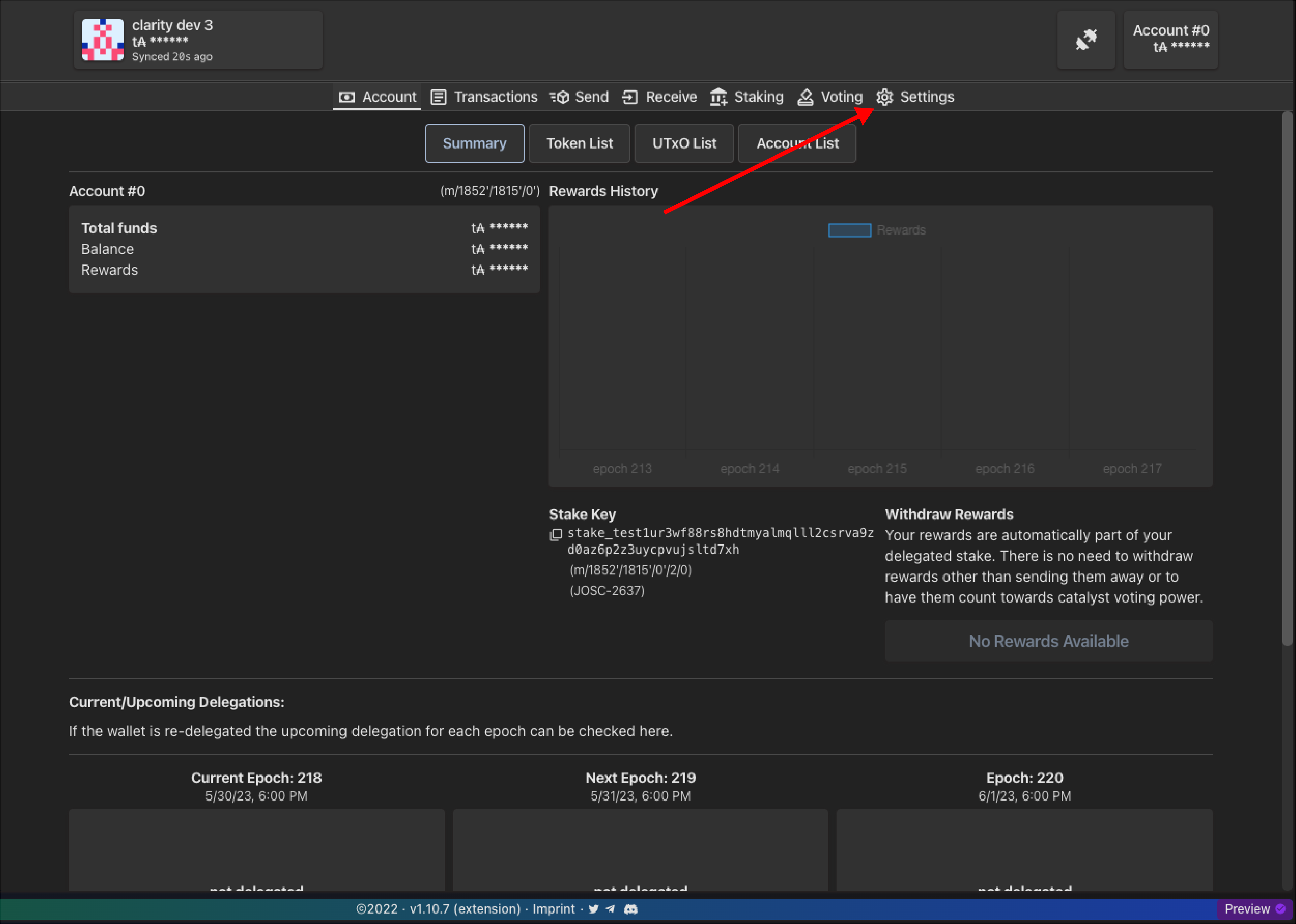
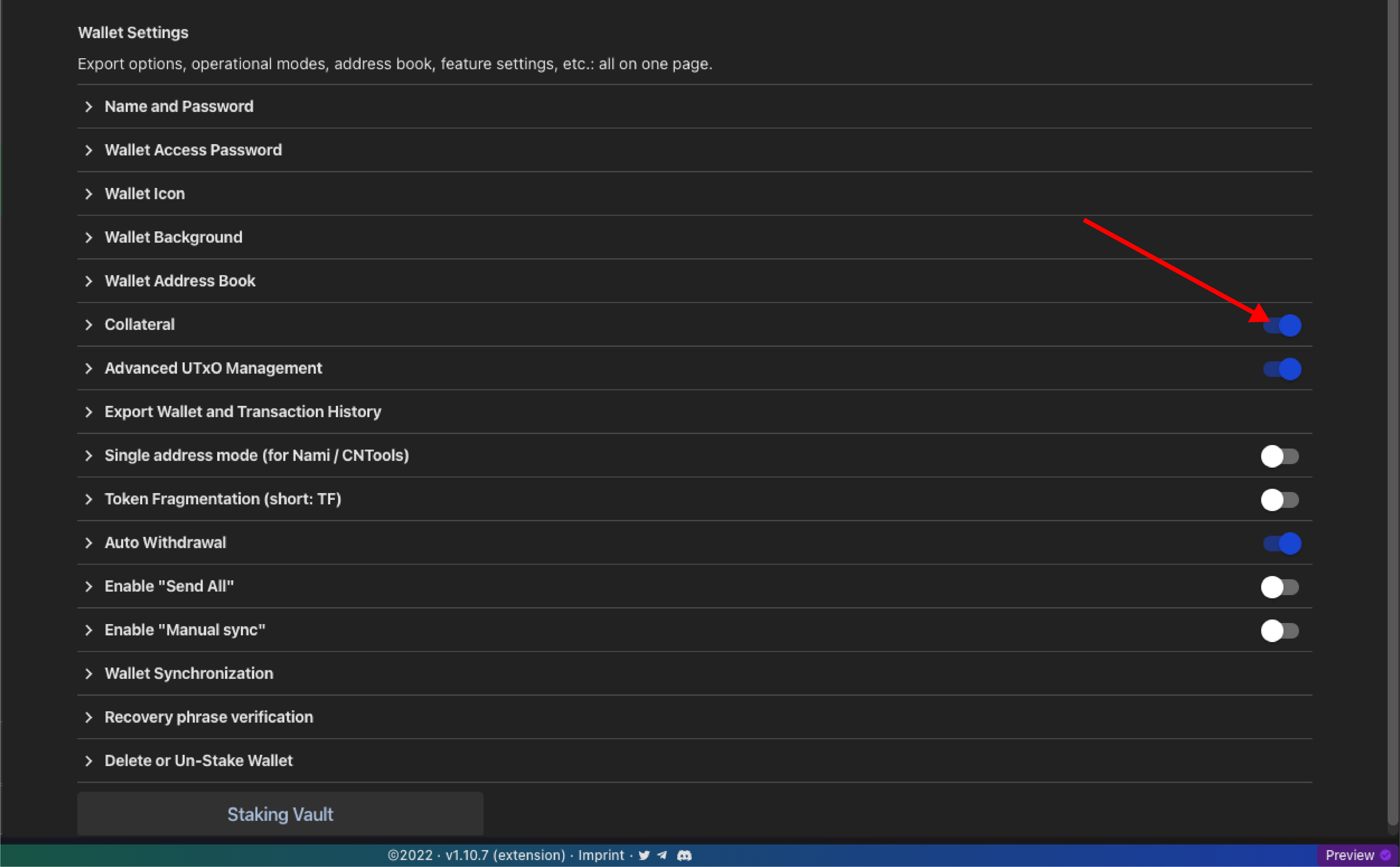
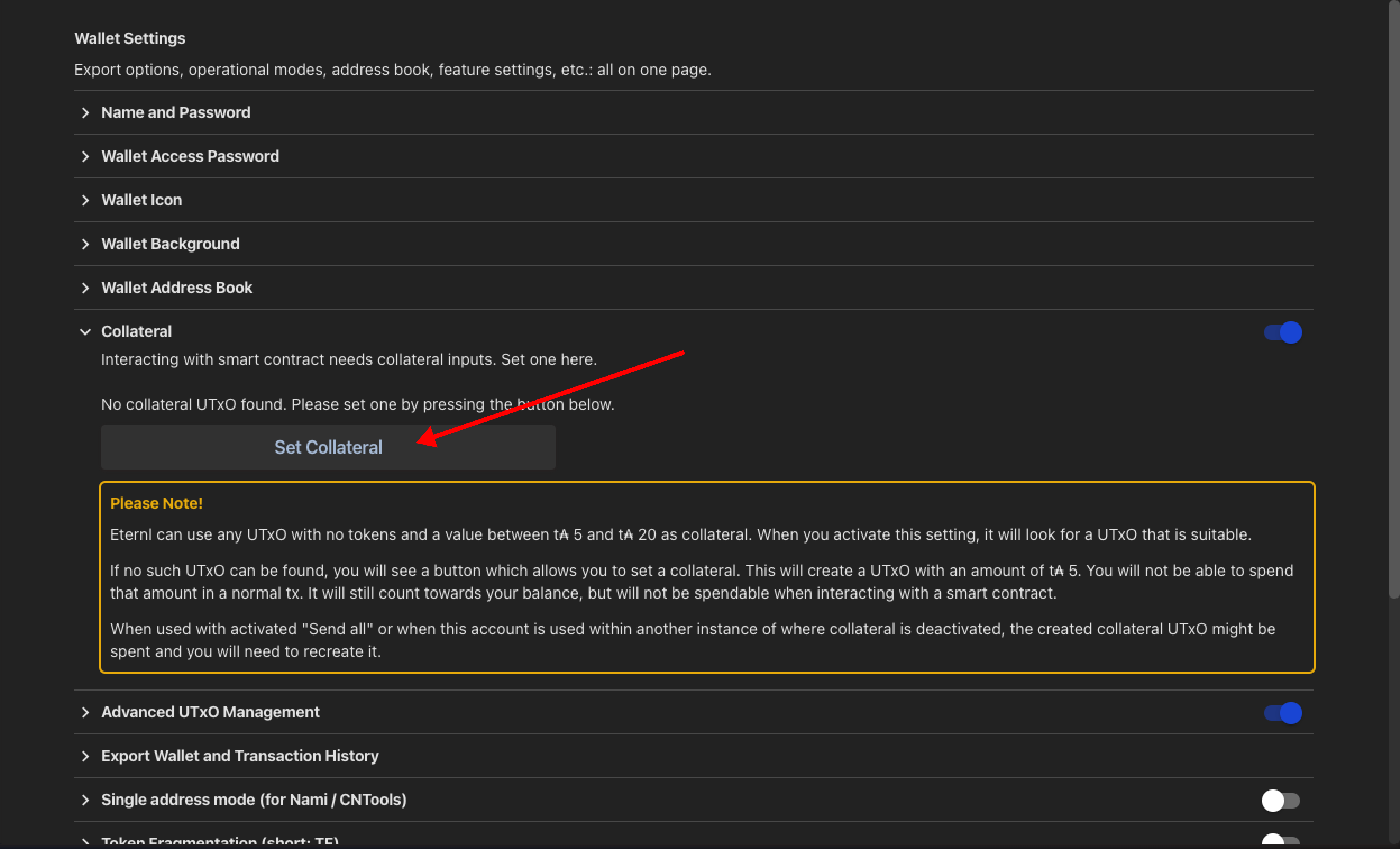


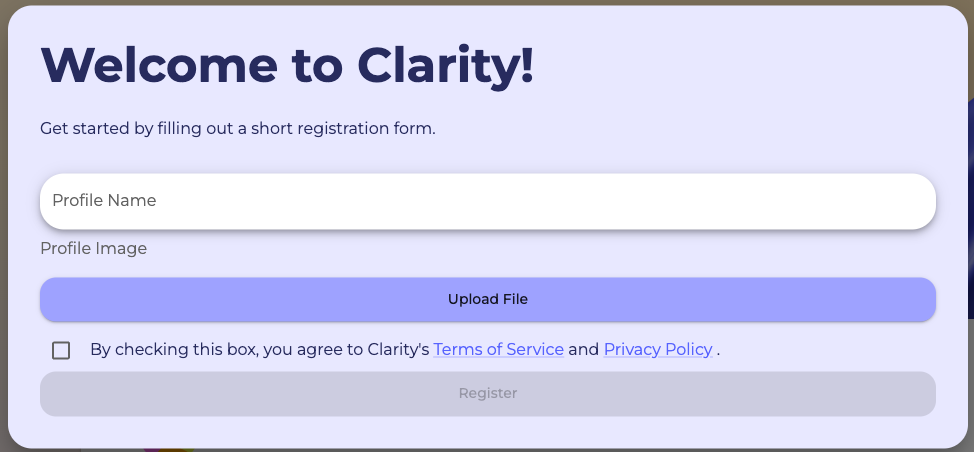


-01.png?alt=media&token=3bb717c7-40cd-44bc-916b-649cd2b2e71f)


.png?alt=media&token=aebe9c60-8b7b-4bbc-93c9-6758949e9d76)

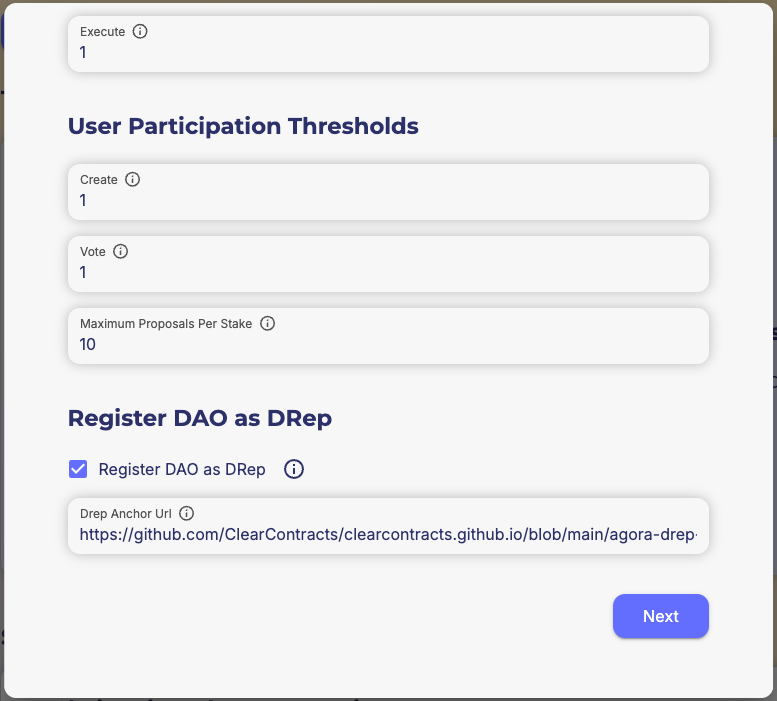


.png?alt=media&token=70d35379-0aa5-4702-9cf2-f1967ddfb2a5)


.png?alt=media&token=39c436f8-1ba3-49c2-b7cf-09899436c55c)


.png?alt=media&token=4e7188fc-c378-4d97-974e-1acc4defefe6)

.png?alt=media&token=96119173-56ad-4f70-8f9d-e45cf1ef8fb0)


.png?alt=media&token=0cb3a450-e3d3-4eda-af8b-29fcdf3f01a2)